
When a new quotation is created, it will always be created with a Pending status.
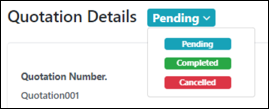
Users can manually change the quotation status by:
|
Step |
Description |
|
1 |
Select the quotation from the quotations list in the main Quotations page. |
|
2 |
Click on the dropdown arrow of the status bar beside the Quote Details header. |
|
3 |
Select the status to change to. |
|
4 |
The quotation will reload and display the updated status. |
When a Pending quotation’s Due Date has passed, the quotation will change its status to Expired.

The Expired status can be manually changed to other statuses.
Was this article helpful?
YesNo
