
The Local Setup page allows you to configure your kiosk’s connection to the local network server and manage key administrative functions such as passwords, app revocation, and cache clearing.
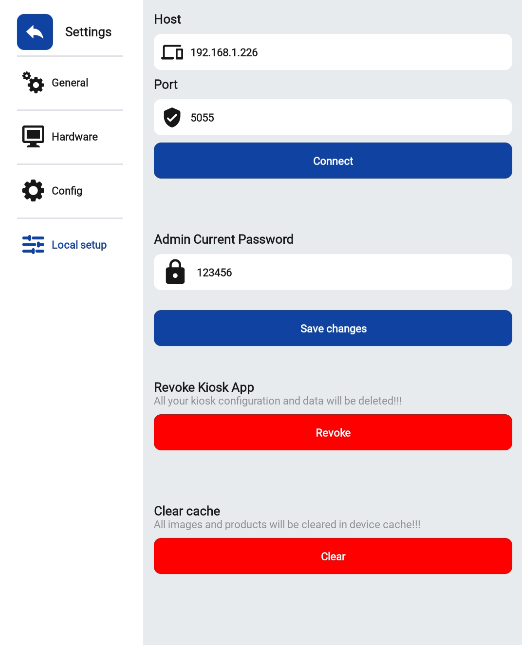
Host & Port Configuration
Use this section to connect your kiosk to the local host server.
-
Host – Enter the IP address of your local server.
Example:192.168.1.226 -
Port – Specify the communication port used for server connection.
Example:5055
After entering the details, click Connect to establish the connection between your kiosk and the server.
Admin Password Management
For security purposes, the Admin Current Password field allows you to update or verify the kiosk’s administrative password.
-
Enter your current password.
-
Click Save changes to confirm and update the configuration.
💡 Tip: Ensure your password is secure and shared only with authorized personnel.
Revoke Kiosk App
Select Revoke to delete all kiosk configurations and data from the device.
⚠️ Warning: This action will remove all app settings and stored information permanently.
Clear Cache
Select Clear to remove all cached images and product data from the device storage.
This helps free up space and ensures that your kiosk displays the most up-to-date content.
