November 2025
This November, several features across our Portrait POS, Android POS have implemented features to enhance the experience of both the users and customers.
What’s New
Not sure which affects you?
These icons indicate which group of users is impacted by each enhancement: Point of Sale (POS) users, Backend users, or Web Ordering App users.
(🖥️ POS — ⚙️ Backend — 📱 Web Ordering App — 🤖 Android POS — 🗣CRM — 👨🍳 Kitchen Display System (KDS) — 📦 Stock Take Device — 🔊Soundbox — 🛒 Kiosk )
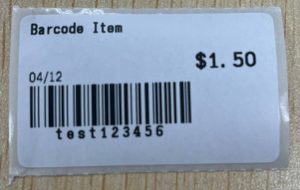
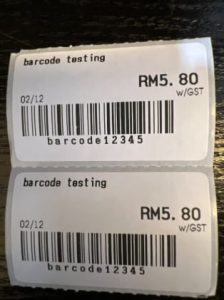
Our Android POS now supports barcode printing onto thermal label stickers. The supported label sticker sizes: 30 x 15mm and 50 x 30mm. The thermal label sticker will display the item name, pricing, barcode, text & GST label (if applicable).
Below is a short video demonstration on how it works!
Sample of barcode label sticker:
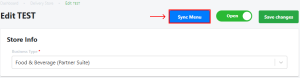
We are excited to announce an enhancement for merchants using the Delivery Plugin: we have added a sync menu button for Deliveroo platform merchants!
This newly released feature will enable merchants to manually sync their menu.
We are excited to announce a major enhancement for merchants using the Delivery Plugin: you can now activate your Grab integration directly through the Backend Portal using a simple self-serve process.
This newly released feature will enable merchants to initiate onboarding directly from the POS Backend. The flow is as follows:
-
Initiate Integration: Navigate to the Delivery Plugin settings in the POS Backend and initialize the integration process for Grab.
-
Log In to Grab Merchant Account: You will be securely redirected to the Grab Merchant portal. Log in using your existing Grab merchant credentials.
-
Enable Connection: Follow the on-screen prompts within the Grab portal to authorize and enable the integration with your POS system.
-
Confirm Status: Once authorization is complete, you will be directed back to your V5 Backend, and the status will immediately display as “Connected.”
We are excited to announce the launch of a new version of our V5 Self-Service Kiosk, specifically tailored for retail businesses such as supermarkets, mini-marts, and convenience stores.
This update brings robust features to enhance the customer experience and streamline your store operations.
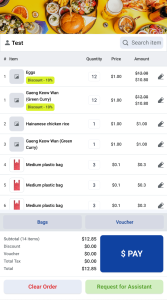
1. Seamless Product Scanning
Customers can quickly add both retail products and weighing-scale items (like fresh produce) to their cart simply by using the kiosk’s built-in scanner.
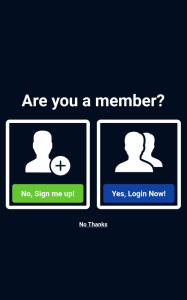
2. Built-in Loyalty & Membership Integration
Customers can easily sign up and log in to their WATI membership directly on the kiosk screen, ensuring they earn points and access member benefits on every purchase.
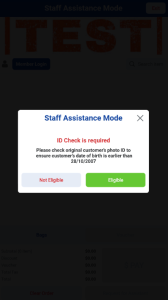
3. Staff Assistance
Users can define which actions (e.g., purchasing restricted products like alcohol or tobacco) automatically prompt a staff member for assistance. Staff can then scan their employee barcode to quickly verify their identity and approve the transaction.
4. Plastic Bag Checkout Prompt
The kiosk will automatically prompt the user to purchase a plastic bag if the system detects they are completing a transaction without one.
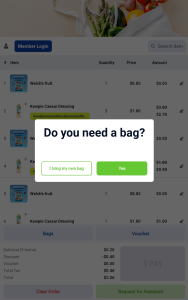
NOTE: Plastic bag prompts can be turned off.
5. Integrated Payment Methods
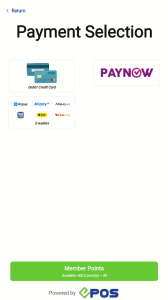
Users can enjoy the same integrated payment methods on Retail kiosks similar to F&B kiosks.
6. Discount Vouchers & Promotions Support
The Retail Kiosk fully supports the application of discount vouchers and promotions, ensuring customers can enjoy instant savings during the checkout process.


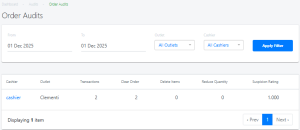
7. Backend Order Audit for Enhanced Security
Merchants can easily view and track staff activities performed at the kiosk (e.g., Transactions, Clear Orders, Delete Items, Reduce Quantity) directly in the backend portal for auditing and security purposes.
For more information on Retail Kiosk, Click HERE!
We have rolled out another series of new features and enhancements to enrich your experience with our Portrait POS solution!
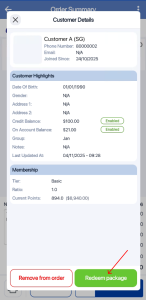
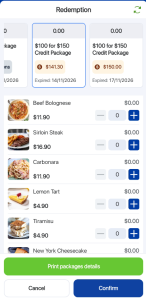
1. Package Product
Users can now redeem customer packages directly from the Customer Details page within the Portrait POS.
2. Variant Product
Users can now select Variant Products by selecting a product that contains multiple variants. After selecting the specific variant combination, the product information will show the price, SKU and item details of that variant.

3. Cash Voucher
Cash voucher transactions are now available on Portrait POS. Users can process them by scanning or manually keying in the voucher code.
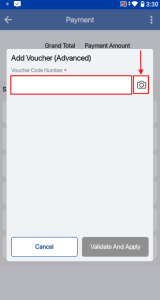
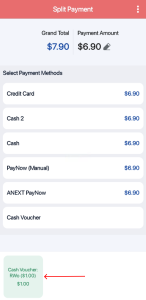
NOTE: For vouchers that cover only a partial amount of the transaction, the POS will automatically direct you to the split payment screen, allowing the customer to pay the remaining balance using another method.
4. Email Receipt
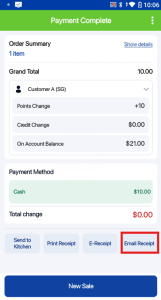
Portrait POS now allows you to send transaction receipts directly to your customers’ email addresses.
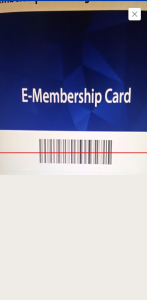
5.Customer Tagging via barcode/QR code scanning
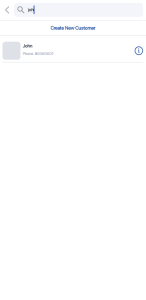
Users can now link a customer to an order quickly using two methods:
- Scanning their membership card’s barcode/QR code or their phone/lookup ID’s barcodes/QR codes.
- Manually typing the customer’s name, phone number, or lookup ID.
6. Three-Seconds Printing
Portrait POS printing sequence now includes an integrated 3-second
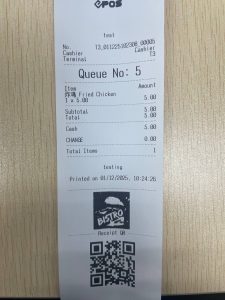
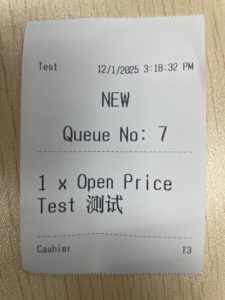
7. Chinese Character & QR Code Receipt Printing
Portrait POS now supports the printing of Chinese characters on both receipts and kitchen slips. Additionally, QR code printing is supported as barcode printing is not functional on a smaller width receipt.
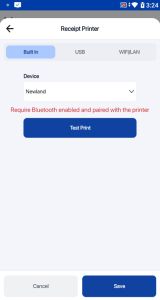
8. Bluetooth-Enabled Built-in Printer
The built-in printer on Newland N950S & N950 devices is now integrated via Bluetooth. Users must ensure the device’s Bluetooth is turned on for the printer to connect and function successfully.
Users can now use the standard Portrait POS devices’ navigation bar controls (usually found at the bottom of the screen) to easily exit or close the application.
Click HERE for more information on Portrait POS!
How to Update
For POS related features, user will need to update the POS to the latest version, version v2.543.
For Backend related features, users are not required to perform any actions, the new features would automatically be updated.
Feedback
We value your input! If you encounter any issues or have suggestions for further improvements, please don’t hesitate to contact us.
Stay Connected
Stay updated with the latest news and updates by following us on our social platforms.
Thank You
We appreciate your continued trust in EPOS. This update is just one of many steps we’re taking to provide you with the best POS system on the market.
If you have any questions or need assistance with the update, please contact our support team at:
Call: 6871 8833 / Email: [email protected] / Whatsapp: 8482 1888