
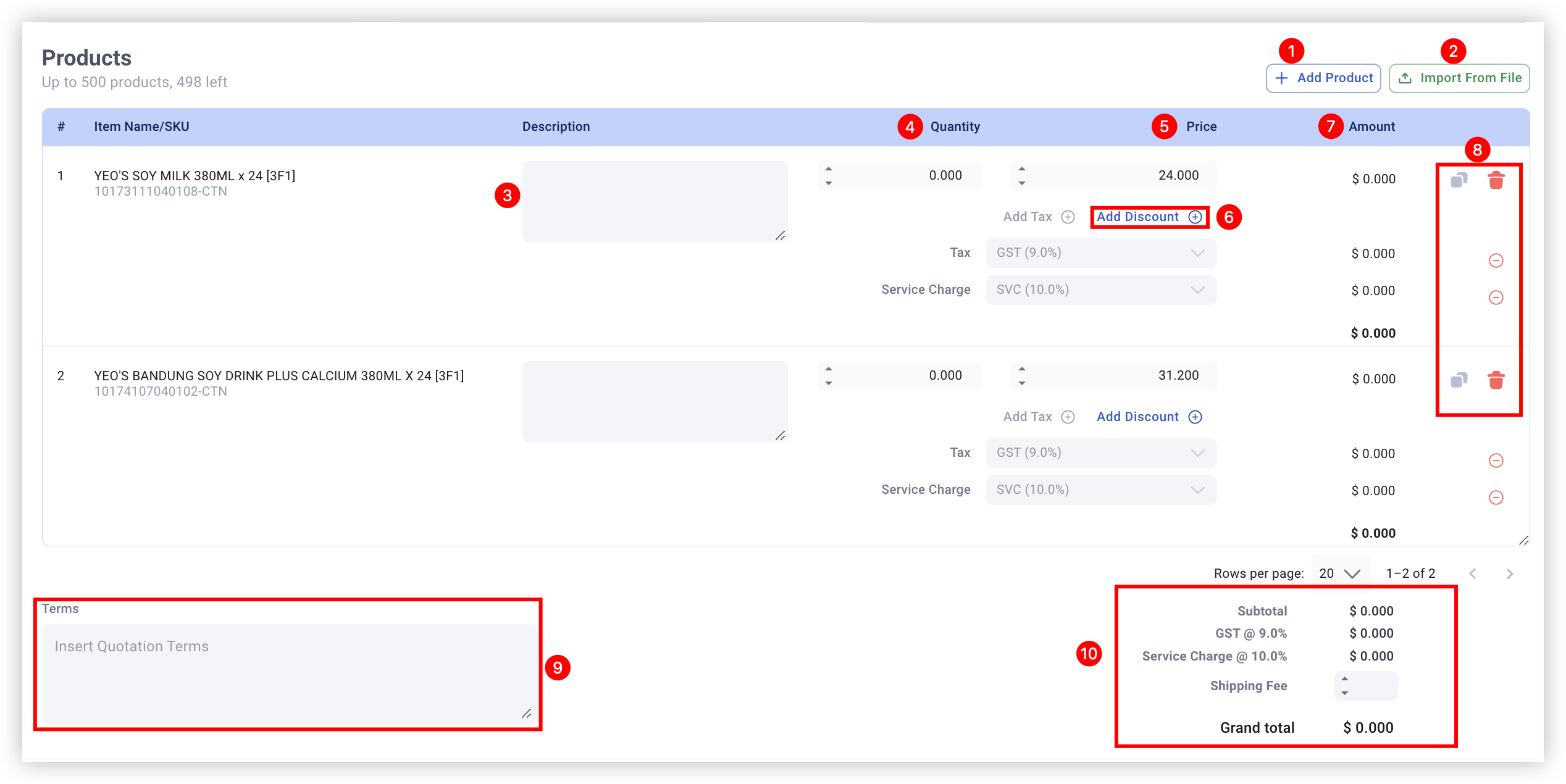
No | Fields/Functions | Description |
1 | Add Product | See the tab “Product Import” – Add Product |
2 | Import from File | See the tab “Product Import” – Bulk Import |
3 | Item Note | Enter any input as a note for the line item. |
4 | Order Qty* | Enter quantity of line item. 💡 This field can support up to 1 decimal place. 💡 If users use the “Add Product” button to add products to the quotation/invoice, this field by default will indicate 0 for all line items. Users will manually enter the quantity for each line item. 💡 If users use the product bulk import for quotation/invoice, this field will automatically be filled with the user’s desired quantity for each item. For more information, see Bulk Import Product. |
5 | Unit Price* | Enter/Change the unit price of line item. 💡 This field will always display the Base Price of the line item product as is recorded in the backend. For more information, see 1.1 Adding a new Product of the EPOS V5 BACKEND MANUAL. |
6 | Discount | Give either dollar($) or percentage(%) discount to each line item. 💡 By default, this field will reflect percentage (%) with a value of 0. Users can leave this field untouched if no discount is to be given. |
7 | Amount | Display the sum total for the line item. 💡[For No Tax] This field is calculated by: (Order Qty x Unit Price) – Discount |
8 | Duplicate / Delete | Duplicate or delete a line item. Duplicate line item: |
9 | Term | Enter input (eg. payment/quotation terms) for the whole quotation/invoice. |
10 | Subtotal / Tax Total / Shipping Fee / Total | Subtotal : Display subtotal amount 💡This field is calculated by summing up all Amounts for each line item. Tax Total : Display default value $0.00 [For No Tax] Shipping Fee : Enter shipping fee (if any) 💡This field can support up to 6 numbers and 2 decimal places Total : Display the quotation/invoice grand total 💡This field is calculated by: (Subtotal + Shipping Fee) |
 Delete line item:
